
Order Fees by oBundle – Flexible, Customizable Checkout Fees for BigCommerce Stores
Add flexible fees to your BigCommerce checkout with conditional rules and clear display.
Developed by oBundle (we have been a BigCommerce Partner since 2014), this app lets you easily charge extra fees or surcharges while keeping customers informed. Start a free trial and take control of your store’s additional charges.
Why Choose Order Fees by oBundle?
If you’re looking to optimize your store’s extra charges, Order Fees by oBundle delivers unmatched flexibility and transparency. Here’s why it stands out:
Flexible Fee Types: Fixed fees, percentage charges, or even customer-entered amounts for any scenario.
Conditional Logic: Set fees to apply only under specific conditions you define.
Transparent Display: Show customers all fees upfront to avoid surprises.
Seamless Integration: Built by a BigCommerce Partner for native checkout support (including B2B).
Key Features
Advanced Conditional Logic
Take full control over when fees apply. The app’s powerful conditional logic lets you combine multiple criteria so fees charge exactly in the scenarios you want – and nowhere else. You can stack rules based on products, customers, shipping methods, order value, and more, ensuring precision in every fee.
-
Trigger fees based on order total thresholds or cart value.
-
Apply surcharges for specific shipping methods or payment gateways.
-
Limit fees to certain products, categories, or customer groups only.
Versatile Fee Options
Not all fees are alike – this app gives you a variety of fee types to match your needs. Charge a flat fee for one-off costs, set a percentage fee that scales with the order total, or even let customers enter an amount (great for tips or donations). Configure any fee structure that fits your business model without hassle.
-
Flat fees (fixed amounts) for services like handling or packaging.
-
Percentage-based fees that scale with order value (e.g. credit card surcharges).
-
Customer-entered fees where shoppers input an amount (e.g. tips or donations).
Transparent Checkout Experience
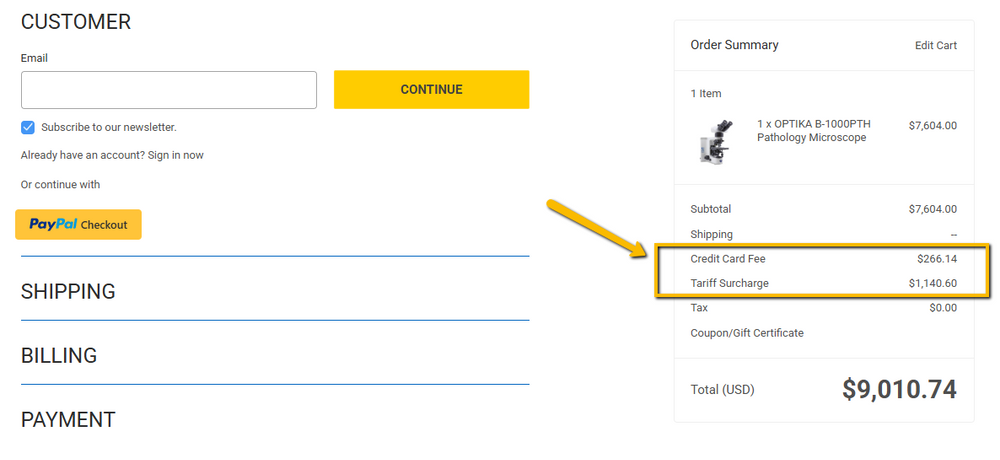
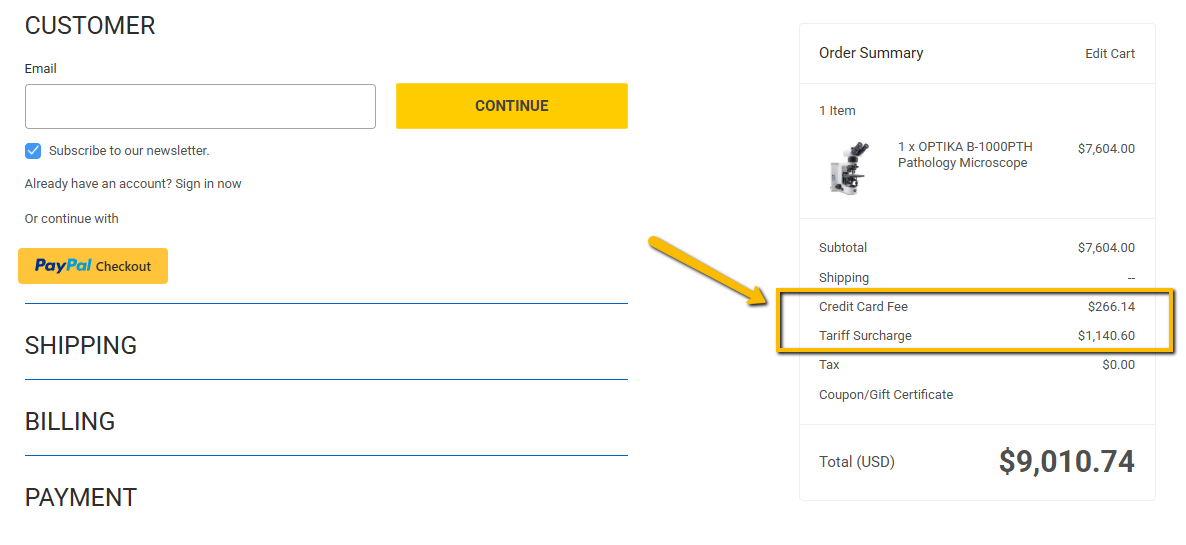
Build trust by being upfront about extra charges. Order Fees by oBundle clearly displays any added fee in the cart and checkout, with custom labels of your choosing. Shoppers see exactly what they’re paying for, eliminating last-minute surprises that can cause cart abandonment.
-
Fees show up as line items in the cart/checkout before payment.
-
Customizable fee labels (e.g. “Handling Fee”) clearly explain each charge.
-
No hidden costs – builds trust and helps reduce cart abandonment.
Seamless BigCommerce Integration & Support
This app is built exclusively for BigCommerce, ensuring a seamless fit into your store’s checkout process. It supports BigCommerce’s latest features – including Multi-Storefront and B2B Edition – so you can apply fees in any selling scenario (even invoice late fees for B2B). And because Order Fees is developed by oBundle, an official BigCommerce Technology Partner, you can count on quality, compatibility, and responsive support.
-
BigCommerce-native and multi-storefront compatible – no custom coding needed.
-
Supports B2B Edition features like invoice late fees for wholesale customers.
-
Built by oBundle (trusted BigCommerce Partner) with regular updates and expert support.
FAQs
How easy is it to set up Order Fees?
It’s very easy. You can install the app with one click from the BigCommerce App Store. The configuration is user-friendly: simply define your fee details and conditions through an intuitive interface – no coding required. (And if you need help, oBundle’s support team is ready to assist.)
What types of fees can I add?
Virtually any type you need. The app supports flat fees (a fixed amount), percentage-based fees (a percent of the order), and even customer-entered fees (where the shopper inputs an amount, like a tip or donation). This means you can set up handling charges, payment surcharges, optional tips, and more.
Can I apply fees only in specific situations?
Absolutely. The app’s conditional logic lets you specify exactly when a fee appears. For example, you can charge a fee only on orders under a certain amount, only for specific products or categories, or only when particular shipping/payment methods are selected. You set the rules – the fee will only show up when those conditions are met.
Will customers see the fees before they pay?
Yes. Any fees you configure are clearly shown to the customer as part of the order summary during checkout. The fee name and amount will be displayed upfront (in the cart/checkout), so customers know about the charge before placing their order – no surprises.
Is it compatible with BigCommerce’s B2B Edition and Multi-Storefront?
Yes, Order Fees works with all BigCommerce store setups, including the B2B Edition and Multi-Storefront. It integrates seamlessly, so you can even apply fees in B2B scenarios like on invoice orders (late payment fees) or run the app across multiple storefronts from one account.
Is there a free trial?
Definitely. Order Fees by oBundle comes with a 14-day free trial, allowing you to try it risk-free on your store. During the trial you have full access to all features, so you can see the value before subscribing.
What kind of support can I expect?
As a product developed by oBundle (an official BigCommerce partner), the app is backed by reliable support. You can expect prompt, helpful assistance via email or support portal if you have any questions or issues. oBundle has a strong reputation in the BigCommerce ecosystem, so you’re in good hands.
Ready to boost your revenue with flexible fees? Install Now on BigCommerce and start your free trial to experience Order Fees by oBundle today!